
Download Cuttermaran – Video Editing, MPEG Processing, Audio Sync, Frame Editing
Overview
Cuttermaran is a specialized mobile application designed for users who require precise control over MPEG video formats. Its primary purpose is to extract specific sequences from MPEG-based video files without the need for format conversion, streamlining the editing workflow for professionals and enthusiasts alike. By preserving the original file structure, Cuttermaran helps users save time and maintain file integrity during video processing tasks. This makes it particularly valuable in environments where efficiency and accuracy are critical, such as video archiving, content creation, and multimedia production.
The app targets individuals working with M1V, M2V, and MPV file types—commonly used in broadcast and digital video applications. These formats often require specialized tools due to their technical structure, and Cuttermaran fills a niche by offering direct access to their internal data streams. Real-world use cases include creating highlight reels from long-form footage, preparing clips for social media, or extracting audio tracks for podcasting. Its ability to maintain synchronization between audio and video components ensures that output files remain professionally usable without post-processing adjustments.
While the developer's background is not publicly detailed, the app's focus on low-level video manipulation suggests a targeted approach to solving technical editing challenges. Despite being released in 2012, Cuttermaran remains relevant in specific workflows where format compatibility and minimal processing overhead are essential. In the broader app ecosystem, it serves as a lightweight utility for users who prefer direct file manipulation over heavy, resource-intensive editing suites.
Key Features & Functionality
- Multiple Format Support: Cuttermaran supports a range of MPEG-based formats, including MPV, M1V, and M2V. This allows users to work directly with these files without conversion, reducing processing time and preserving original quality.
- Sequence Extraction: Users can select and extract specific video segments from larger files. This feature is ideal for isolating key moments in long recordings, such as interviews, events, or training sessions, without altering the source material.
- Audio and Video Sync: The app ensures accurate synchronization between audio and video components in the output. This is crucial for maintaining professional-grade results, especially in projects where timing precision is essential.
- Frame Editing Functionality: While basic editing is available, Cuttermaran can be extended using TMPGEnc 2.5 for advanced frame-level adjustments. This integration allows for deeper control over video sequences, appealing to users who require detailed manipulation.
- OGG Episode Creation: The app enables the creation of audio-only episodes in OGG format. This expands its utility beyond video editing, supporting audio-focused workflows such as podcast production and audio archiving.
For example, a video editor working with archived MPEG footage can use Cuttermaran to extract a 30-second clip for a promotional teaser. The app ensures the audio remains perfectly aligned, and the output can be directly shared or further processed. Similarly, a podcast producer might use the OGG export feature to generate clean audio files from video sources.
Interface, UX & Performance
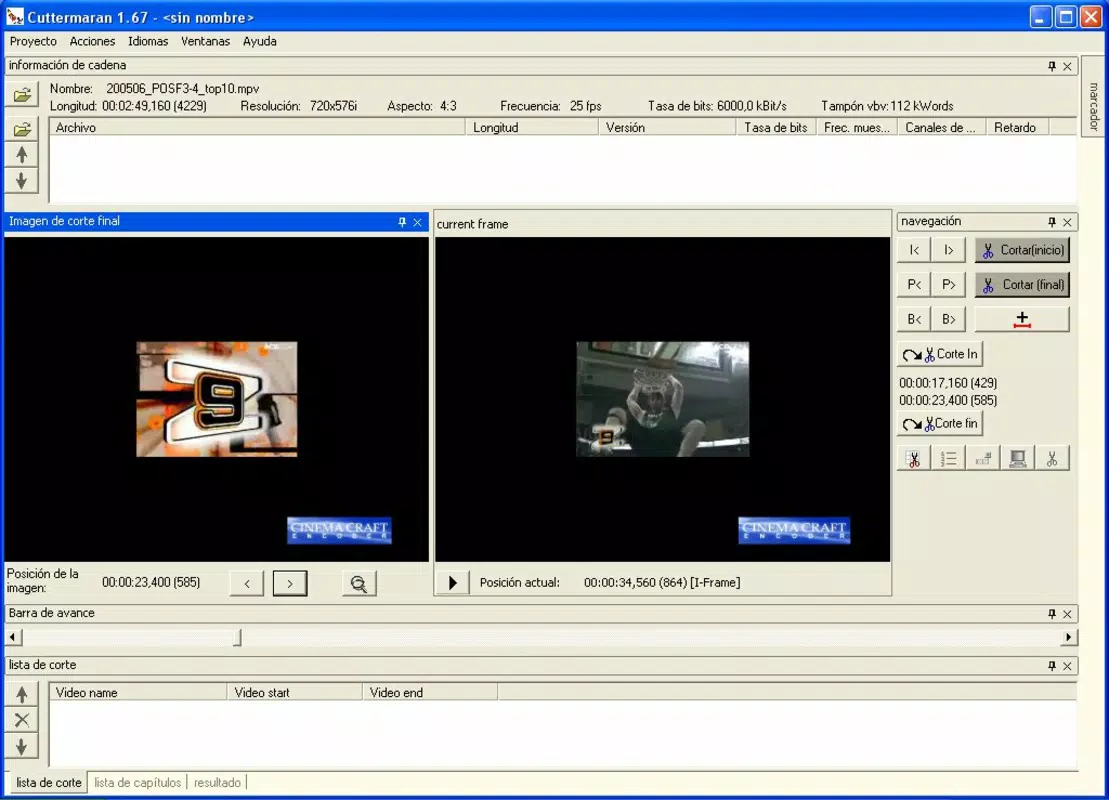
The user interface of Cuttermaran appears designed for functionality over visual flair, prioritizing access to core editing tools. Navigation is likely linear and task-oriented, allowing users to load a file, select a segment, and initiate extraction with minimal steps. The layout probably emphasizes control panels for timecodes, format selection, and output settings, reflecting its technical focus.
While specific performance metrics are not available, the app’s lightweight nature suggests it operates efficiently on a range of devices. Although the developer did not list formal performance metrics, its ability to handle MPEG streams directly implies optimized resource usage. Users can expect responsive behavior during file loading and sequence selection, though complex operations may vary depending on device capabilities.
Stability is likely consistent for its intended use cases, given its long-standing presence in niche workflows. However, compatibility with modern operating systems is not confirmed. The app may require legacy environments or emulated settings on newer devices, which could affect usability. Overall, the experience remains focused on delivering reliable results for targeted tasks.
Platform Compatibility & Technical Requirements
Cuttermaran is available on Android and iOS platforms, though specific OS versions and device compatibility details were not disclosed by the developer. The app’s file size is not listed, but given its specialized function, it likely remains compact to maintain efficiency. Users should verify device requirements before installation, as the developer did not specify minimum OS versions or hardware specifications.
Although the developer did not list formal performance metrics, the app’s ability to handle MPEG streams directly implies optimized resource usage. Users can expect responsive behavior during file loading and sequence selection, though complex operations may vary depending on device capabilities.
Pros and Cons
- Direct support for M1V, M2V, and MPV formats without conversion
- Efficient sequence extraction preserves original file integrity
- Accurate audio-video synchronization in output files
- Extensible via TMPGEnc 2.5 for advanced frame editing
- Supports OGG audio export for multimedia versatility
- No publicly available updates since 2012
- Compatibility with modern OS versions not confirmed
- Interface lacks modern design elements
- Technical requirements not clearly defined
- Dependence on external software (TMPGEnc) for advanced features
FAQ
Is Cuttermaran safe to download and install?
The app is available through official channels and has been used in professional workflows. However, users should ensure they are downloading from trusted sources to avoid modified or compromised versions.
Can I use Cuttermaran on iOS and Android devices?
Cuttermaran is available on both platforms, but specific compatibility with current iOS and Android versions has not been confirmed by the developer.
Do I need to pay to use Cuttermaran?
The app’s pricing information was not provided. Users should check the official store listing for current pricing and availability.
What should I do if Cuttermaran crashes on my device?
Since the app has not been updated since 2012, compatibility issues may arise on newer devices. Try running it in compatibility mode or consult the developer’s support resources if available.
Can I edit video frames directly in Cuttermaran?
Cuttermaran provides basic editing features. For advanced frame-level editing, users must integrate it with TMPGEnc 2.5, which is not included in the app.
Final Thoughts
Cuttermaran stands out as a focused tool for professionals and hobbyists working with MPEG video formats. Its ability to extract sequences without conversion, maintain audio-video sync, and support OGG export makes it a valuable asset in specialized workflows. While its interface and update history reflect its age, its core functionality remains effective for users who prioritize precision and efficiency.
Those who frequently handle M1V, M2V, or MPV files—such as video archivists, content curators, or multimedia producers—will benefit most from its targeted features. Despite its limitations, Cuttermaran offers a lightweight, secure solution for specific video processing needs.
Download Cuttermaran now


